Businesses today depend on software for almost every part of their operations. Customer management, finance, sales, inventory, communication, analytics, automation, and internal workflows all require reliable digital systems.
As organizations grow, off-the-shelf software may not always match their processes. Businesses may need custom applications that integrate existing systems, automate repetitive tasks, improve data visibility, and support future growth.
This is where enterprise software development becomes important.
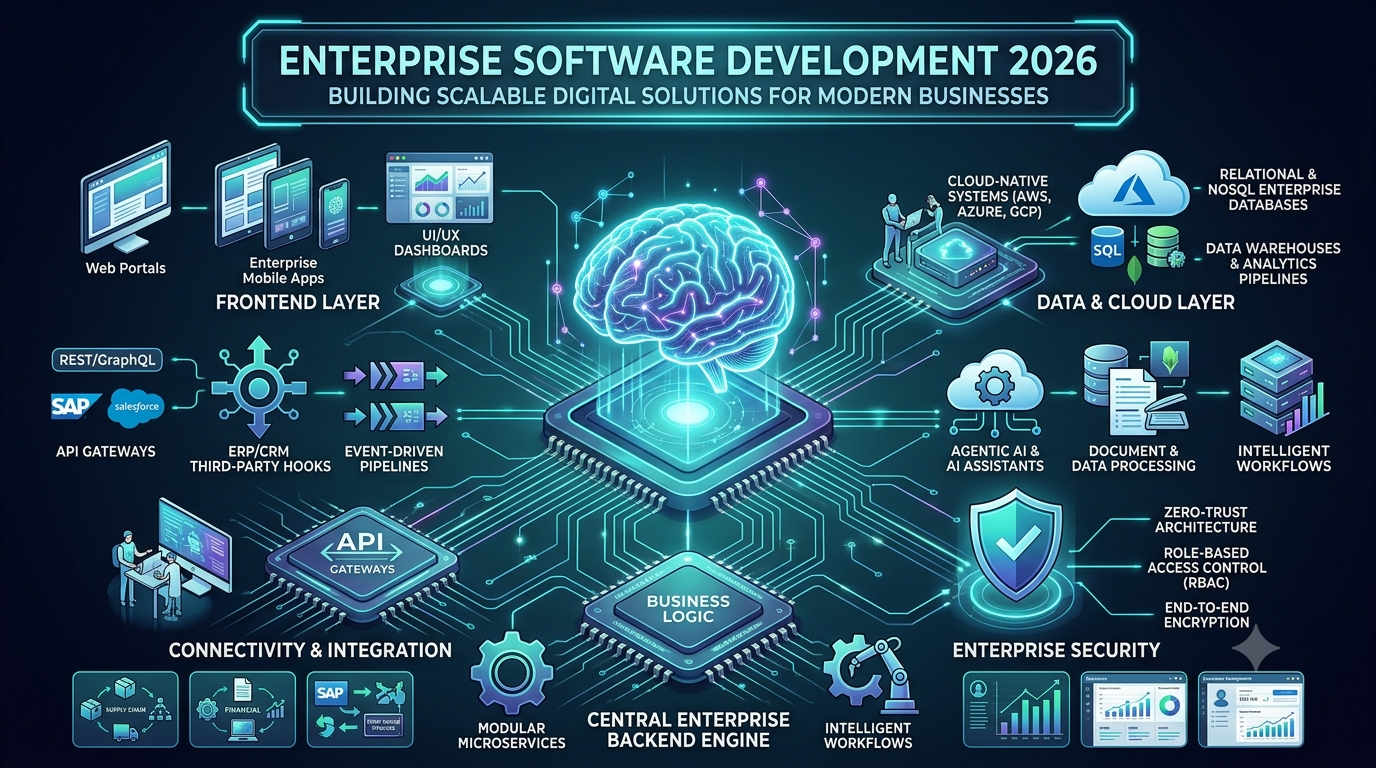
In 2026, enterprise software is increasingly combining cloud computing, artificial intelligence, automation, APIs, data analytics, and modern application architectures to create connected digital environments.
For organizations planning a new software platform, the goal is not simply to build an application. The goal is to create a secure, scalable, maintainable system that supports long-term business requirements.
What Is Enterprise Software Development?
Enterprise software development is the process of designing and building software applications for organizations with complex operational, technical, and business requirements.
Enterprise applications can support:
- Customer relationship management
- Business operations
- Financial management
- Supply-chain processes
- Employee workflows
- Data analytics
- Inventory management
- Sales operations
- Customer support
- Business automation
Unlike a simple consumer application, enterprise software often needs to integrate with multiple systems and support different categories of users.
A typical enterprise architecture may include:
Users → Web/Mobile Application → APIs → Business Logic → Database → External Systems
Why Businesses Need Custom Enterprise Software
Every organization operates differently.
A generic software platform may provide useful features, but businesses sometimes need workflows that are specific to their industry or internal processes.
Custom enterprise software can help organizations address requirements such as:
- Unique business workflows
- Legacy-system integration
- Custom reporting
- Internal automation
- Advanced permissions
- Data consolidation
- Industry-specific processes
- Custom customer experiences
The software can be designed around the organization’s existing operations instead of requiring employees to completely change their processes.
Key Features of Modern Enterprise Software
Modern enterprise applications can include a wide range of capabilities.
1. Cloud-Based Architecture
Cloud infrastructure allows businesses to deploy applications without maintaining all infrastructure on physical servers.
Cloud-based systems can support:
- Scalability
- Remote access
- Centralized management
- Automated backups
- High availability
- Infrastructure monitoring
Cloud architecture should still be designed according to the application’s security, compliance, performance, and availability requirements.
2. API Integration
Enterprise businesses rarely operate with a single software platform.
An organization may use:
- CRM software
- ERP software
- Payment systems
- HR platforms
- Accounting software
- Marketing tools
- Inventory systems
- Customer-support platforms
APIs allow different systems to exchange information.
For example:
CRM → API → Enterprise Application → ERP
This can reduce duplicate data entry and create more connected workflows.
3. Artificial Intelligence
AI is becoming an increasingly important component of enterprise software.
Businesses can integrate AI for:
- Document processing
- Customer support
- Data analysis
- Search
- Recommendations
- Content generation
- Forecasting
- Workflow automation
- AI assistants
AI can be implemented as one component within a larger application rather than replacing the entire software system.
4. Business Automation
Enterprise software can automate repetitive workflows.
For example:
New Customer → Data Validation → CRM Entry → Email → Task Assignment → Reporting
Automation can reduce manual steps and help employees focus on higher-value activities.
5. Data Analytics
Enterprise systems generate large amounts of data.
Analytics dashboards can help organizations monitor:
- Revenue
- Sales
- Customer activity
- Inventory
- Operational performance
- Employee workflows
- Marketing performance
Real-time or near-real-time dashboards can provide decision-makers with centralized visibility into business operations.
Enterprise Application Development Process
A successful enterprise software project requires structured planning.
Step 1: Business Requirement Analysis
Before development begins, the development team should understand the organization’s requirements.
Important questions include:
- What business problem needs to be solved?
- Who will use the system?
- Which existing systems need integration?
- What data needs to be managed?
- What processes should be automated?
- What security requirements apply?
Clear requirements can reduce costly changes later.
Step 2: Software Architecture
The architecture defines how the system’s components interact.
A modern enterprise architecture may contain:
- Frontend
- Backend
- APIs
- Databases
- Authentication
- Cloud infrastructure
- AI services
- External integrations
- Monitoring systems
Architecture decisions should account for expected users, data volume, integrations, security, and future expansion.
Step 3: UI/UX Design
Enterprise applications often contain complex workflows.
A well-designed interface can make those workflows easier to understand.
Important considerations include:
- Navigation
- Dashboards
- Search
- Forms
- Data visualization
- User permissions
- Mobile responsiveness
- Accessibility
The objective is to make complex business operations easier to manage.
Step 4: Backend Development
The backend handles:
- Business logic
- APIs
- Authentication
- Data processing
- Integrations
- Workflow automation
A modular backend can make the application easier to maintain and expand.
Step 5: Database Development
The database stores application information.
Depending on requirements, an enterprise application may use relational databases, NoSQL databases, data warehouses, caching systems, or a combination of technologies.
Database architecture should consider:
- Data volume
- Query performance
- Security
- Backups
- Availability
- Scalability
Step 6: Integration
Enterprise applications frequently need to connect with existing systems.
Integration may include:
- REST APIs
- Webhooks
- Authentication systems
- Payment gateways
- ERP systems
- CRM systems
- Cloud services
Step 7: Testing
Enterprise software requires comprehensive testing.
Testing may cover:
- Functional requirements
- API functionality
- Security
- Performance
- Database operations
- Integration
- User permissions
- Cross-browser compatibility
- Mobile responsiveness
Step 8: Deployment
After testing, the application can be deployed to its production environment.
Deployment should include appropriate:
- Monitoring
- Logging
- Backups
- Security controls
- Error tracking
- Disaster-recovery planning
Step 9: Maintenance and Optimization
Enterprise software is rarely a one-time project.
After launch, businesses may need:
- Security updates
- Performance improvements
- New integrations
- Feature development
- Bug fixes
- Infrastructure optimization
- AI model updates
Enterprise Software Security
Security is one of the most important considerations in enterprise application development.
A business application may contain sensitive information about customers, employees, finances, operations, or intellectual property.
Security measures can include:
- Multi-factor authentication
- Role-based access control
- Encryption
- Secure APIs
- Audit logs
- Session management
- Data backups
- Vulnerability testing
- Network security
- Secure cloud configuration
Access should follow the principle of giving users only the permissions they require for their role.
AI-Powered Enterprise Applications
AI can turn traditional enterprise software into more intelligent systems.
For example, an enterprise knowledge assistant could allow employees to ask:
“Show me the latest sales report for our western region.”
The application could retrieve authorized business information and present the relevant data.
AI can also support:
- Automated document classification
- Intelligent search
- Customer-service assistants
- Sales analysis
- Forecasting
- Workflow recommendations
- Internal knowledge systems
However, enterprise AI requires careful consideration of data access, security, model behavior, accuracy, and human oversight.
Enterprise Mobile Applications
Employees and customers increasingly expect access to business applications from mobile devices.
Enterprise mobile applications can support:
- Field employees
- Sales teams
- Delivery operations
- Managers
- Customers
- Service technicians
A mobile application can communicate with enterprise backend systems through secure APIs.
For example:
Mobile App → API → Authentication → Enterprise Backend → Database
This allows users to access business information while maintaining centralized data management.
Enterprise Software and Automation
Automation can connect different business systems into a single workflow.
Consider a purchase-order process:
Purchase Request → Approval → ERP → Supplier Notification → Inventory Update → Reporting
Without automation, employees may need to manually move information between multiple systems.
Enterprise software can automate these steps and create an auditable workflow.
Scalability in Enterprise Software
Enterprise applications need to accommodate business growth.
A system may initially serve hundreds of users and later need to support thousands or more.
Scalability considerations include:
- Cloud infrastructure
- Database architecture
- API performance
- Caching
- Load balancing
- Asynchronous processing
- Microservices where appropriate
- Monitoring
Not every application requires microservices. The architecture should match the actual business and technical requirements.
Enterprise Software Integration Challenges
Integration is often one of the most difficult parts of enterprise development.
Existing systems may use different:
- Data formats
- APIs
- Authentication methods
- Business rules
- Database structures
A well-designed integration layer can help normalize information and reduce dependencies between systems.
Legacy System Integration
Many established organizations continue to use older software.
Replacing a legacy system immediately may be expensive or operationally risky.
Instead, businesses can sometimes build modern APIs and integration layers around existing systems.
This allows modernization to happen gradually.
Enterprise Software Development Trends in 2026
Several technology trends are influencing enterprise software development.
AI Agents
AI agents are increasingly being explored for multi-step business workflows.
Rather than only generating text, agent-based systems can potentially interact with approved tools and business applications to complete tasks.
Generative AI
Generative AI can support:
- Content generation
- Summarization
- Search
- Data analysis
- Customer support
- Knowledge management
Intelligent Automation
Businesses are combining AI with workflow automation to reduce repetitive work.
Cloud-Native Applications
Cloud infrastructure continues to provide businesses with scalable application deployment and infrastructure-management options.
Data-Driven Applications
Organizations increasingly want software that converts operational data into actionable insights.
Connected Enterprise Platforms
Instead of operating isolated applications, businesses are increasingly connecting CRM, ERP, finance, customer support, analytics, and other systems through APIs and shared data workflows.
How Much Does Enterprise Software Development Cost?
The cost of enterprise software development depends heavily on the project’s requirements.
Factors include:
- Application complexity
- Number of users
- Number of platforms
- UI/UX requirements
- Backend architecture
- Database requirements
- Third-party integrations
- AI functionality
- Security requirements
- Cloud infrastructure
- Testing
- Maintenance
A basic internal business application can have a very different cost from a large enterprise platform connecting multiple systems.
For an accurate estimate, businesses should first define the application’s scope, integrations, user roles, and technical requirements.
How to Choose an Enterprise Software Development Partner
Businesses should evaluate potential development partners based on factors such as:
- Relevant technical experience
- Enterprise architecture knowledge
- Security practices
- API integration experience
- Cloud development capabilities
- AI development expertise
- Communication processes
- Testing methodology
- Post-launch support
The development partner should understand the business problem rather than focusing only on technology.
Why Choose Custom Enterprise Software Development?
Custom development allows businesses to create software around their specific requirements.
It can provide control over:
- Features
- Workflows
- Integrations
- User experience
- Security
- Data
- Infrastructure
- Scalability
For organizations with complex workflows, custom enterprise software can provide a foundation for digital transformation.
Conclusion
Enterprise software development in 2026 is increasingly focused on creating connected, intelligent, scalable, and secure business systems.
Modern enterprise applications can combine cloud computing, APIs, artificial intelligence, automation, analytics, mobile applications, and enterprise integrations to support complex business operations.
However, successful enterprise software is not defined by the number of technologies used. The architecture should be built around the organization’s actual requirements, users, data, security needs, and long-term objectives.
Businesses planning a new enterprise application should begin with a clear understanding of the problem, define the required workflows, design an appropriate architecture, and plan for security and scalability from the beginning.
With the right development strategy, custom enterprise software can become a long-term technology foundation for business growth and digital transformation.
Frequently Asked Questions
What is enterprise software development?
Enterprise software development involves creating applications designed to support the complex workflows, data, integrations, security requirements, and operational needs of organizations.
What is the difference between custom and off-the-shelf software?
Off-the-shelf software provides predefined functionality for a broad group of users. Custom software is developed around the specific workflows and requirements of an individual business.
Can AI be integrated into enterprise software?
Yes. AI can be integrated into enterprise applications for search, document processing, customer support, analytics, recommendations, automation, and other use cases.
Can enterprise software integrate with existing systems?
Yes. APIs, webhooks, integration platforms, and other technologies can connect new applications with existing CRM, ERP, payment, accounting, HR, and other systems.
How long does enterprise software development take?
The timeline depends on application complexity, number of platforms, integrations, security requirements, AI functionality, testing, and the size of the development team.
Is enterprise software scalable?
It can be. Scalability should be considered during architecture and database design so that the system can accommodate increasing users, transactions, and data volumes.
Primary Keyword: Enterprise Software Development
Secondary Keywords:
Enterprise Software Development Company, Custom Enterprise Software Development, Enterprise Application Development, Enterprise Software Solutions, Custom Software Development, Enterprise App Development, Business Software Development, Enterprise Application Development Services, AI Enterprise Software Development, Enterprise Digital Transformation
SEO Title:
Enterprise Software Development in 2026: Scalable Business Solutions
Meta Description:
Learn how enterprise software development in 2026 helps businesses build scalable, secure, AI-powered applications with APIs, automation, cloud, and enterprise integrations.
Suggested URL Slug:/enterprise-software-development/
Leave a Reply